Next: The Colour Concept Up: Graphics Previous: Specifying Workstation Types Contents Index
SPECTRAThe sections 15.3.69 and 15.3.16 give more details about these commands.>create/text/string="Ein Beispiel Text" 0.2
SPECTRA>set 0.2/y=0.8/col=2
TEXTs may be displayed using different character sets.
SPECTRA supports only those fonts
that appear both in X and in Postscript (ISOLatin1Encoding Vector),
see the table in section 15.3.69.
The download section of this manual (![[*]](crossref.png) ) provides
a file that shows the available fonts.
Any character can be accessed by its octal value, e.g.:
) provides
a file that shows the available fonts.
Any character can be accessed by its octal value, e.g.:\101 is 'A'.
Apart from plain text, SPECTRA offers the possibility to display special characters, subscripts, superscripts, ... SPECTRA is rather limited in this respect, but whenever a feature is included, it is done a LaTex style syntax. So far we have:
| Symbols
The available symbols are displayed in tables, starting in section 15.3.69. Example: \angstroem  Å. Å. |
In-line font selection
\nf{new_number}. |
| Indices
$text_{subindex}^{superindex}$. |
| ä, ö, ü, ß
Example: G\"ansef\"u\ss{}chen Gänfüßchen |
Space
\hspace{x}, \vspace{y}, \sp{x,y}: x and y are
measured in the NDC frame. |
Escape character:\
|
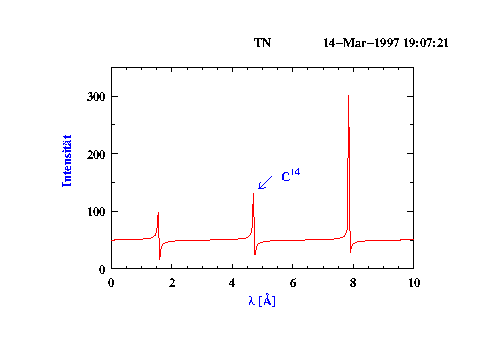
The figure in section 10.4 shows some example TEXTs. Here is the code
!
! nano latex example
!
 create tn 0 10 200
 calc tn = tan(tn) + 50
!
! col=2 ist red
!
 set 1/col=2
!
! col=4 is blue
!
 set 1.3/col=4/string="\lambda [\angstroem{}]"
!
! Make an Umlaut.
!  - Notice that a double quote '"' which is preceeded
!    by a slash '\' has not to be 'closed' by a second '"'.
!  - ux, uy are the up-vector which rotates the text.
!  - h_align=2 means 'centered' horizontal alignment.
!  - col=4 is blue
!
 set 1.4/col=4/string=Intensit\"at/y=0.5
 set 1.4/x=-0.15/uy=0/ux=-1/h_al=2
!
! Create a TAG.
!  - tag_type=3 selects an left-arrow
!  - par2 is the angle.
!
 crea/tag/col=4/tag_typ=3/string="C$^{14}$" 1
 set 1.5/par2=45/x=0.56/y=0.46

 display
 post/eps